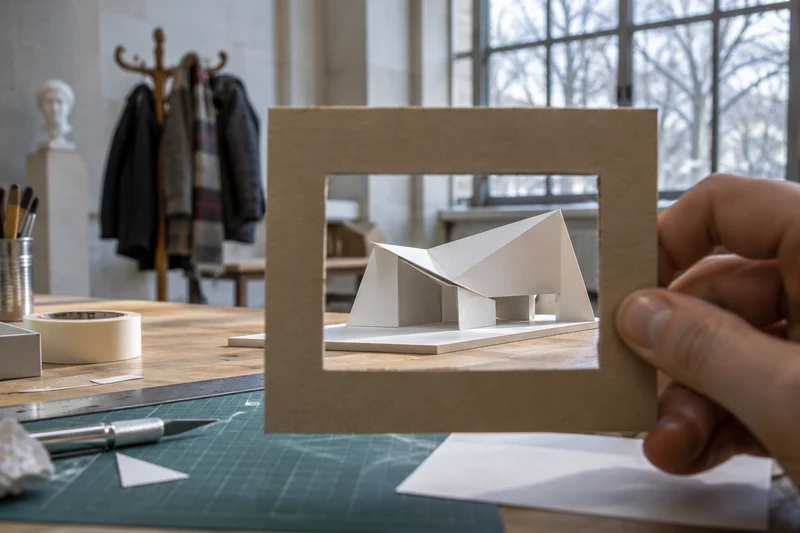
Build a separate public copy around one decision you made. Check what each picture shows, inspect the files you offer and test the page as a signed-out visitor before sharing it.
Choose The Decision You Want Someone To See
Imagine you have made a cardboard model of a library entrance. Your best photograph shows the ramp, the doorway and the little turn you added so that visitors can wait under cover. It also shows the view from your bedroom. The photograph you would happily send to a friend does two jobs at once: it explains a design and tells a story about where you live. A stranger considering your work needs only the first story.
Begin with a sentence you would like that stranger to be able to finish: the designer changed the entrance because… If the answer is visible in a close view of the model and a sketch of the previous version, you have the makings of a strong portfolio page. You can leave out the wide shot. You have also made an editorial choice that improves the work: the reader knows exactly where to look. For another way to choose what belongs on the page, see how to show a design decision in a portfolio.
Make A Public Copy From A Blank Page
Keep the working folder as a record for yourself. For the public version, start with an empty folder and put in only the things that earn their place. That feels slower than duplicating a whole folder and deleting the awkward bits. Try it with just one project. It is much easier to explain why you added three items than to remember what might be tucked inside thirty.
For the entrance model, those items might be a side view, a plan drawn on clean paper and a few sentences about the turn before the door. Write the caption from scratch. Describe the constraint, the first attempt and the detail you reconsidered. A reader can understand a design problem without knowing which teacher set it, the address of the building that inspired it or the date your class will visit.
Give each public file a useful name. An entrance side view is easier to find again than a string of initials, a class code and a version number. Read the name alongside the caption. Together they should tell a small, coherent story about the project. If your caption promises a comparison, include the earlier sketch so the visitor can actually make it. If you are gathering examples from school or home, start with an evidence folder you can build without an internship.
Look Around The Edges Of The Picture
Before editing a busy picture, consider taking another one. Stand the model on a plain sheet and put a second sheet behind it. Move until the join at the doorway is easy to see. Turn the model rather than photographing towards a window. Check the edges for a letter, a badge, a timetable or somebody else's face. A quieter background is good for the reader as well as for you.
Now look beyond the visible picture. Apple explains that when sharing a photo from an iPhone you can turn off Location under the sharing options. That setting deals with location data in that share; it cannot hide a street name painted on a wall. Equally, a neatly cropped image is no reason to assume that location information has been removed. Check the copy you actually mean to upload, using the controls available on your own device.
Sometimes the least revealing picture is also the most useful one. Suppose your model has a removable roof. Lift it and photograph the route through the entrance from above. A visitor can follow the movement without needing to see the room surrounding the model. Let the design question suggest the camera angle before reaching for a blur tool.
Give Your Reader The Result, Not Your Working File
A beautifully tidy slide can have an untidy history. Microsoft provides a Document Inspector for finding hidden data and personal information in supported Office files. Its guidance advises working on a copy because some removals cannot be undone. If you plan to offer a download, inspect the actual file you intend to provide. Looking at the slide in presentation mode answers a different question: what does the audience see during a talk?
Ask what the download contributes. If the reader needs to compare two sketches, you could place the images alongside separate captions on the page. If the work is an essay, a short extract with a note about the argument might show your thinking better than a whole marked assignment. Keep teacher comments and classmates' suggestions for your own reflection unless you have a clear reason and permission to share them.
There is a useful middle ground between posting the whole thing and leaving an empty space. Recreate a diagram with invented labels and say that the labels are illustrative. If your original exercise used somebody else's survey responses, explain the question you investigated and show a blank example of how you organised an answer. Don't turn invented responses into claimed findings. Protecting the people behind a project should never require pretending you collected different evidence.
Try describing the same piece to two different people. A tutor who already knows the assignment might understand a slide headed “second iteration”. A visitor coming to it cold needs a little more: a first drawing with a narrow doorway, a second with room to turn, and a caption saying what prompted the change. Replacing a school-specific heading with that short explanation gives the stranger more useful information while telling them less about your class.
Decide Where The Audience Ends
A public portfolio and a submission to a course team need not contain the same things. Read the actual submission instructions before deciding what belongs in either place. Where an institution asks for identifying information through its application process, use the channel it specifies. That requirement alone gives you no reason to print the same details on a page anyone can visit.
For a group project, name your contribution precisely. You might have drawn the entrance plan while somebody else built the model. A sketch of your route and an explanation of your choices can carry the page without showing your collaborator's photograph or claiming the whole design. If you want to include shared work, agree what may appear and how credit will be given. When agreement is missing, choose a piece you can show independently.
Consider the route back to you as carefully as the route into the work. If the page is for a particular application, the reviewer may already have a way to contact you. You need not add a personal telephone number just to make the page look finished. For younger students, choosing the intended audience and discussing contact options with a trusted adult is a useful part of making the portfolio together. For a software example, see how to build a no-code project around one user’s problem.
Try The Stranger Test In Ten Minutes
Open the proposed page in a signed-out window and hand it to someone who did not work on the project. Ask them to point to the decision you made and the evidence behind it. Then ask what they can work out about the people and places involved. Listen without explaining. If they can identify your school but cannot tell which part you designed, the page has made the wrong things easy.
Follow every download and every link from that page. Does the visitor get the single example you chose or a larger folder? Can they read the caption on a phone without enlarging it? Does the image still explain the change when the two versions appear one above the other? Put the earlier version first and label the changed detail in words. That small edit helps a reader who cannot see both versions at once.
Finish by making one addition and one subtraction. Add the detail that best shows your judgement: perhaps an arrow at the tight turn or one sentence explaining why you kept the canopy. Remove the detail that tells a stranger something unnecessary. Save the working originals privately. Your next portfolio project can start with those two questions: what will help someone understand my work, and what is mine to keep?